
Windows 11 Running Slow — How to Diagnose It
A slow PC is usually caused by one hardware resource hitting 100%. Task Manager reveals the culprit in seconds.
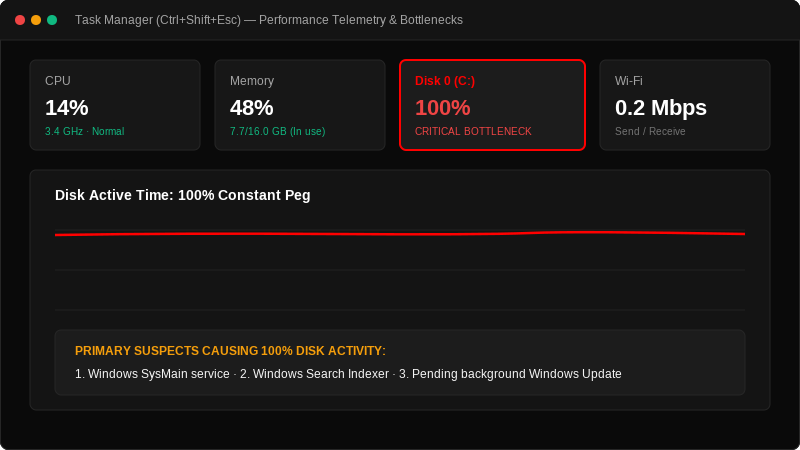
A sluggish Windows 11 computer is almost always caused by a single bottlenecked hardware resource hitting 100% capacity. Task Manager lets you identify the offending process in seconds. If network latency is also high, run our Network Latency Test or review Wi-Fi Keeps Disconnecting.
Identify the 100% resource peg in Task Manager
Press Ctrl + Shift + Esc to open Task Manager. Select the Performance tab. Inspect CPU, Memory, and Disk 0. If any counter is pegged at 99–100% continuously, click the Processes tab and click that column header to sort by usage.
Disable SysMain (Superfetch) for mechanical drives and stuttering SSDs
Press Win + R, type services.msc and press Enter. Scroll down to SysMain. Right-click → Stop. Double-click SysMain and set Startup type to 'Disabled'. This halts continuous background drive prefetching.
# Find top 10 memory-consuming applications on Windows 11
Get-Process | Sort-Object WorkingSet -Descending | Select-Object -First 10 ProcessName, @{Name='RAM (MB)';Expression={[math]::Round($_.WorkingSet/1MB,1)}}
Performance diagnostic checklist
- ✓Task Manager performance meters inspected
- ✓SysMain service disabled if Disk is pegged at 100%
- ✓Startup apps trimmed in Task Manager → Startup apps
- ✓Storage Sense enabled to clean temporary Windows Update cache files
Diagnostic Network & Related Fixes

Jadox is a software developer and technology enthusiast who enjoys figuring out why computers stop working the way they should. He creates practical content about Windows, PC hardware, drivers, networking, audio, updates, and other common computer problems. Through RoxyTech, Jadox focuses on making technical problems easier to understand by explaining what can cause them, what to check, and how to get things working again. The content is based on testing solutions and breaking down technical problems into simple steps. His goal is to make technology easier to understand and troubleshooting less frustrating for everyday computer users.